🏆 BEST 96% WIRELESS MECHANICAL KEYBOARD
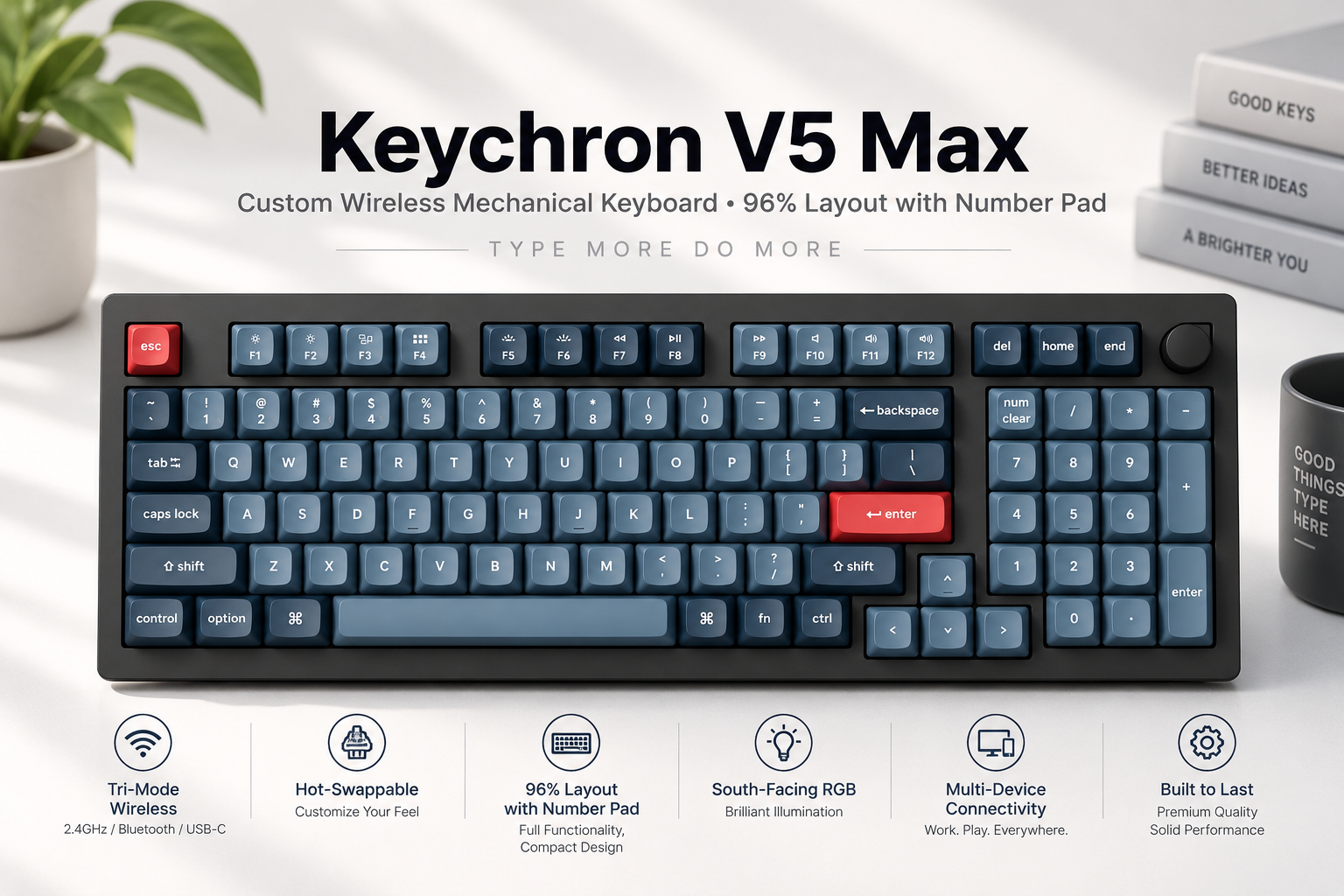
If you want a mechanical keyboard that combines a compact design with a dedicated number pad, the Keychron V5 Max Wireless Mechanical Keyboard is worth considering. Its 96% layout keeps the number pad and most essential keys while using less desk space than a traditional full-size keyboard.
The V5 Max also offers 2.4GHz wireless connectivity, Bluetooth 5.1, USB-C wired operation, hot-swappable mechanical switches, RGB backlighting, and customizable key assignments. These features make it appealing to programmers, office professionals, data-entry users, and people who prefer a customizable keyboard for everyday work.
Unlike a basic wireless keyboard, the Keychron V5 Max is designed for users who want more control over their typing experience. You can choose a suitable switch type, customize key functions, and connect to different devices depending on your setup.
Quick verdict: The Keychron V5 Max is a strong option for users who need a number pad, wireless flexibility, and mechanical-keyboard customization in a relatively compact layout. However, its relatively heavy build and mechanical typing noise may not suit every workspace.
Check the Keychron V5 Max on Amazon
Keychron V5 Max: At a Glance
| Feature | Details |
|---|---|
| Keyboard type | Mechanical |
| Layout | 96% compact, 1800-style layout |
| Number pad | Yes |
| Connectivity | 2.4GHz wireless, Bluetooth 5.1, USB-C wired |
| Switches | Gateron Jupiter options on the fully assembled version |
| Hot-swappable | Yes, compatible with many 3-pin and 5-pin MX-style switches |
| Backlighting | South-facing RGB |
| Keycaps | Double-shot PBT, OSA profile |
| Battery | 4,000 mAh rechargeable battery |
| Battery life | Up to 190 hours with backlighting off under manufacturer test conditions |
| Customization | QMK firmware and Keychron Launcher |
| Compatible operating systems | Windows, macOS, Linux |
| Mount design | Gasket mount |
| Weight | Approximately 925 g for the fully assembled version |
| Connection port | USB-C |
Specifications can vary by layout, configuration, and regional version. Battery life depends on settings and usage. Verify the selected model before purchasing.
Manufacturer source: Keychron V5 Max official product page.
1. Compact 96% Layout with a Dedicated Number Pad
One of the main attractions of the Keychron V5 Max is its 96% layout. It keeps a number pad, arrow keys, function keys, and most of the keys people use on a conventional full-size keyboard, but arranges them more compactly.
This design is useful for people who regularly work with spreadsheets, financial records, calculations, or numerical data but do not want a separate number pad taking up additional desk space.
Why the 96% layout matters
- For programmers: Access to navigation keys and a number pad without needing a traditional full-size keyboard.
- For office workers: Convenient numerical entry for spreadsheets and business applications.
- For students: Useful for assignments, research, coding, and general productivity.
- For small desks: A more compact arrangement than many standard full-size keyboards.
The compact layout does require some adjustment if you are accustomed to a full-size keyboard. Key spacing and the positions of certain navigation keys may feel different at first.
2. Three Connection Options for Different Workflows
The Keychron V5 Max supports three ways to connect: 2.4GHz wireless, Bluetooth, and a wired USB-C connection.
2.4GHz wireless
The included 2.4GHz receiver provides a wireless connection intended for responsive typing and gaming. Keychron specifies a 1,000Hz polling rate for 2.4GHz and wired modes.
This option is suitable for desktop users who want a responsive connection without keeping a cable attached during normal use.
Bluetooth 5.1
Bluetooth is useful when connecting to compatible laptops, tablets, or other devices without using a dedicated USB receiver. The keyboard supports switching between up to three Bluetooth devices, making it practical for a multi-device workspace.
For example, you could use Bluetooth for a laptop and tablet, then switch to the 2.4GHz receiver on your main desktop.
USB-C wired connection
The wired mode is useful when you want to charge the keyboard while working, avoid wireless interference, or configure the keyboard through the supported web-based customization tool.
Buying tip: If you mainly use the keyboard for competitive gaming, consider 2.4GHz or wired mode rather than Bluetooth. The specified polling rate is lower in Bluetooth mode.
3. Mechanical Switch Options and Hot-Swappable Design
The fully assembled Keychron V5 Max is offered with Gateron Jupiter switch options, including Red, Brown, and Banana variants, depending on availability and configuration.
Switch choice influences how the keyboard feels and sounds. Your preferred option depends on whether you prioritize smooth keystrokes, tactile feedback, or a more pronounced typing response.
Which switch should you choose?
Red switches: A linear feel without a tactile bump. These may suit users who prefer smooth keystrokes for gaming and general typing.
Brown switches: A tactile bump provides feedback during a keypress without the pronounced click of a clicky switch. They can be a balanced choice for mixed work and personal use.
Banana switches: A more pronounced tactile feel may appeal to people who enjoy stronger feedback while typing.
These are general descriptions of switch types; the precise feel and sound depend on the switch version and the rest of the keyboard.
What does hot-swappable mean?
The V5 Max has hot-swappable switch sockets, allowing compatible switches to be replaced without soldering. This is useful if you want to experiment with different switch types or replace a faulty switch later.
Before buying replacement switches, confirm compatibility with the keyboard’s sockets and the switch pin configuration. Turn off or disconnect the keyboard before making changes, and use an appropriate switch puller.
4. QMK Customization and Programmable Keys
The Keychron V5 Max is designed for users who want to personalize their keyboard beyond standard key functions.
Its QMK firmware and Keychron Launcher web application support key remapping and macros. Depending on your workflow, you can configure shortcuts for applications, development tools, and repetitive tasks.
Examples of useful customizations include:
- Assigning a shortcut to launch a frequently used application.
- Creating a macro for a repetitive sequence of commands.
- Adjusting key functions to match your preferred workflow.
- Setting up shortcuts for coding, editing, and productivity tools.
This flexibility is particularly useful for developers and power users who rely on keyboard shortcuts throughout the day.
Important: Key remapping and macro configuration may require a compatible browser and a wired USB connection. Check the current manufacturer instructions before configuring the keyboard.
Official resource: Keychron V5 Max and customization information.
5. RGB Backlighting for a Personalized Setup
The V5 Max features south-facing RGB LEDs. You can customize the lighting to match your workspace or personal preferences.
RGB lighting is primarily an aesthetic feature, but it can also help personalize a desk setup. If you work in a dim room, adjust the lighting to a comfortable brightness rather than assuming brighter lighting will improve visibility.
One limitation to note is that the supplied double-shot PBT keycaps are not shine-through. This means the legends themselves are not designed to illuminate through the keycaps in the same way as shine-through keycaps.
If illuminated legends are a priority, check the keycap design and product configuration carefully before purchasing.
6. Gasket Mount and Typing Feel
The Keychron V5 Max uses a gasket-mount design with a polycarbonate plate and sound-absorbing materials. This construction is intended to provide a more flexible typing feel and help reduce acoustic resonance compared with some more rigid keyboard designs.
The typing experience also depends on the switches, keycaps, stabilizers, and the surface on which you place the keyboard.
The included double-shot PBT OSA-profile keycaps are designed to resist wear and legend fading. Their shape combines a profile closer to OEM height with a more rounded, sculpted appearance.
The keyboard also uses screw-in stabilizers to help support larger keys such as the space bar and Enter key.
Keep in mind that a gasket mount does not make a mechanical keyboard silent. Switches still produce sound, and the amount of noise depends on the chosen switch and typing style.
7. Battery Life and Charging
The Keychron V5 Max has a 4,000 mAh rechargeable battery. Keychron lists battery life of up to 190 hours with the backlighting turned off under its test conditions. Its specifications also list up to 100 hours with RGB lighting at the lowest brightness.
These figures are manufacturer estimates, not guaranteed real-world results. Battery life varies with RGB brightness, connection mode, usage, and other settings.
For longer wireless use:
- Reduce RGB brightness or switch the lighting off.
- Use the connection mode that best suits your setup.
- Charge the keyboard when convenient rather than waiting until you need it urgently.
- Check the manufacturer’s guidance for charging and battery care.
The keyboard charges through USB-C, so you can keep it connected by cable when wireless use is unnecessary.
8. Compatibility with Windows, macOS, and Linux
The Keychron V5 Max supports Windows, macOS, and Linux. It also includes a system toggle and keycaps for Windows and macOS on the fully assembled version, according to the manufacturer.
This flexibility can be helpful for developers who work across multiple operating systems or users who switch between a personal computer and a work laptop.
However, some keyboard shortcuts and system-specific key assignments can behave differently across operating systems. Review the selected configuration and setup instructions if you need a particular shortcut arrangement.
Keychron V5 Max Pros and Cons
Pros
- Compact 96% layout with a dedicated number pad.
- Supports 2.4GHz wireless, Bluetooth, and USB-C wired operation.
- Hot-swappable switches allow customization without soldering.
- QMK firmware and Keychron Launcher provide key-remapping and macro options.
- Gasket-mount design and polycarbonate plate.
- Double-shot PBT keycaps.
- RGB backlighting for a personalized setup.
- Compatible with Windows, macOS, and Linux.
Cons
- The compact layout may take time to learn if you are used to a full-size keyboard.
- Mechanical switches can be too noisy for quiet shared offices, depending on the selected switches and typing style.
- The approximately 925 g assembled weight makes it less convenient for frequent travel.
- RGB lighting can reduce battery life.
- The supplied keycaps are not shine-through, which may disappoint users who want illuminated legends.
- Customization features may be unnecessary for users who only need a basic keyboard.
Who Should Buy the Keychron V5 Max?
The V5 Max is worth considering if you want a versatile keyboard with a number pad and the ability to customize your typing experience.
Recommended for
Programmers and software developers: QMK customization, navigation keys, and multiple connection options can support a personalized development workflow.
Spreadsheet and data-entry users: The dedicated number pad is convenient for numerical input.
Mechanical keyboard enthusiasts: Hot-swappable switches and customizable key assignments allow further personalization.
Multi-device users: Bluetooth and 2.4GHz connectivity provide different options for connecting to computers and compatible devices.
Home-office users: The compact layout can help preserve desk space while retaining many full-size keyboard functions.
Who should consider alternatives?
- Users who need a silent keyboard: Consider a keyboard designed specifically for quiet operation, or investigate compatible quieter switches.
- Frequent travelers: A smaller and lighter keyboard may be easier to carry.
- Users on a tight budget: A simpler wired mechanical keyboard may offer better value if wireless connectivity and customization are unnecessary.
- Users who need a full-size layout: Compare the V5 Max with a conventional full-size keyboard if you prefer more separation between the navigation cluster and number pad.
Keychron V5 Max vs. Other Keyboard Types
| Feature | Keychron V5 Max | Basic wireless keyboard | Full-size mechanical keyboard |
|---|---|---|---|
| Number pad | Yes | Depends on model | Usually |
| Mechanical switches | Yes | Depends on model | Usually |
| 2.4GHz and Bluetooth | Yes | Depends on model | Depends on model |
| Hot-swappable switches | Yes | Uncommon | Depends on model |
| Advanced key customization | QMK and Launcher | Usually limited | Depends on model |
| Compact desk layout | Yes | Depends on model | Usually takes more space |
| Best suited for | Customizable productivity and gaming | Everyday basic typing | Users who prefer a traditional full-size layout |
This is a comparison of product categories, not a laboratory performance test. Features vary by individual keyboard model.
Other keyboards worth comparing
Keychron V5: Consider comparing the standard V5 if you like the compact layout but do not need all the V5 Max’s wireless features. Check the exact specifications of the version you are considering.
Keychron V6 Max: A relevant alternative if you prefer a larger, more conventional full-size layout with a number pad. Compare its dimensions and feature set with the V5 Max before deciding.
A basic full-size wireless keyboard: A practical option if your priorities are simple typing, a number pad, and a lower overall cost rather than mechanical switches and extensive customization.
If you are choosing a keyboard primarily for programming, see our related guide: Best Mechanical Keyboards for Programmers.
Setup Tips Before Using the Keychron V5 Max
Follow these steps to get started:
- Choose your connection mode. Use the appropriate switch or setting for 2.4GHz wireless, Bluetooth, or wired operation according to the user guide.
- Connect the keyboard. For 2.4GHz, use the supplied receiver. For Bluetooth, follow the pairing instructions for your device. For wired operation, connect the USB-C cable.
- Select your operating system. Set the keyboard to the appropriate Windows or macOS mode if required.
- Check the switch configuration. If purchasing a fully assembled keyboard, verify the supplied switch type before ordering additional switches.
- Customize the keys if needed. Use Keychron Launcher and follow the official configuration instructions. A wired connection may be required.
- Adjust the lighting. Select a comfortable RGB effect and brightness level.
- Test your workflow. Check the number pad, arrow keys, shortcuts, and any remapped keys in your usual applications.
For additional computer-setup advice, explore our guide to USB-C docking stations for multiple monitors.
Price and Buying Advice
The price of the Keychron V5 Max can vary according to the seller, region, switch option, layout, and whether you choose a fully assembled or barebone version. Promotions and availability may also change.
Before buying, check:
- Whether the listing is for the fully assembled or barebone version.
- Which switch type is included.
- Whether the keyboard has the ANSI or a regional ISO layout you want.
- Whether the seller ships to your country.
- Shipping fees, import duties, taxes, and return conditions.
- Whether the listing includes the receiver and accessories you expect.
The barebone version is intended for users who want to supply compatible components themselves. Do not assume it includes the same switches and keycaps as the fully assembled version.
Check current availability: Search for the Keychron V5 Max on Amazon.
For buyers in Bangladesh, confirm international shipping availability and the final delivered cost before ordering. A low listed price may not reflect the total cost after shipping and applicable import charges.
Frequently Asked Questions
1. Does the Keychron V5 Max have a number pad?
Yes. Its 96% compact layout includes a dedicated number pad along with arrow and navigation keys.
2. Is the Keychron V5 Max wireless?
Yes. It supports 2.4GHz wireless and Bluetooth 5.1, as well as USB-C wired operation.
3. Can I use the Keychron V5 Max for programming?
Yes. Its number pad, mechanical switches, multiple connection options, and customizable key assignments can suit programming workflows. Whether it is the best choice depends on your preferred layout and switch feel.
4. Are the switches hot-swappable?
Yes. The keyboard supports compatible 3-pin and 5-pin MX-style mechanical switches. Confirm the compatibility of replacement switches before buying them.
5. Does the Keychron V5 Max work with macOS and Windows?
Yes. The manufacturer lists compatibility with Windows, macOS, and Linux. Some shortcuts and system-specific settings may differ between operating systems.
6. How long does the battery last?
Keychron lists up to 190 hours with backlighting off under its test conditions and up to 100 hours with RGB at the lowest brightness. Actual battery life varies with usage and settings.
7. Is the Keychron V5 Max good for gaming?
It can be suitable for gaming, particularly through its 2.4GHz or wired connection, which supports a specified 1,000Hz polling rate. Gaming performance also depends on the game, the user’s preferences, and other system components.
8. Is the Keychron V5 Max silent?
No. It is a mechanical keyboard, and the sound depends on the selected switches, keycaps, typing style, and workspace. Users who need very quiet typing should consider quieter switches or a keyboard designed for low-noise operation.
9. Can I customize the keys and macros?
Yes. QMK firmware and Keychron Launcher support key remapping and macros. Check the official instructions for supported functions and setup requirements.
10. Is the Keychron V5 Max better than a full-size keyboard?
Neither layout is universally better. The V5 Max offers a compact arrangement with a number pad, while a conventional full-size keyboard may feel more familiar to users who prefer more space between key clusters.
Final Verdict: Is the Keychron V5 Max Worth Considering?
The Keychron V5 Max Wireless Mechanical Keyboard with Numpad is a compelling option for users who want the practicality of a number pad without choosing a traditional full-size keyboard. Its 2.4GHz wireless connection, Bluetooth support, USB-C wired mode, hot-swappable switches, RGB lighting, and QMK customization give it flexibility for work and personal use.
Its biggest strengths are the compact 96% layout and customization options. Its main trade-offs are its weight, the possibility of mechanical typing noise, and the learning curve associated with a compact key arrangement.
Our recommendation: Consider the Keychron V5 Max if you want a customizable mechanical keyboard for programming, productivity, numerical entry, and everyday gaming. If you only need a basic keyboard or prioritize quiet operation, compare simpler or quieter alternatives before purchasing.
Check the Keychron V5 Max on Amazon
Research and Affiliate Disclosure
Research disclosure: This article is based on publicly available manufacturer information and product specifications. DevSetupGuide has not claimed hands-on testing of this keyboard. Actual typing experience, sound, battery life, and performance can vary by configuration and usage.